Why do standard alarms miss rotating shifts?
A nurse working two days on and two days off starts the next work block on a different weekday. A firefighter, doctor, or factory worker can have the same problem: the repeating unit is the rota, not the calendar week. A Monday-to-Friday wake-up can ring during recovery sleep or stay off on a working Saturday.
Clock offers weekday repeats. It has no work/rest cycle editor. A shift schedule alarm clock needs an anchor date and a cycle length to keep those days moving together.
Which alarm setup fits your shift schedule?
| Your schedule | Useful option | What to check |
|---|---|---|
| Same weekdays and wake-up time | iPhone Clock | Select the working weekdays. |
| Consecutive work days, then consecutive rest days | Alarm One Rotation | Set the first work date and both day counts. |
| Different times or scattered dates each month | Alarm One specified-date alarms | Enter each wake-up date and time from your roster. |
| Roster notes, invitations, or shared shifts | Calendar plus an alarm where needed | Event notifications and wake-up alarms serve different jobs. |
When choosing the best alarm clock for shift workers, check cycle support, a calendar view, skip controls, and visible upcoming dates. If you need an alarm app that syncs with a shift roster, check the exact import or integration before choosing. The setup below enters a cycle manually; it does not import an employer roster.
How do you set a rotating schedule alarm in Alarm One?
Set the wake-up time
Create an alarm and allow time for preparation and travel before the shift begins.
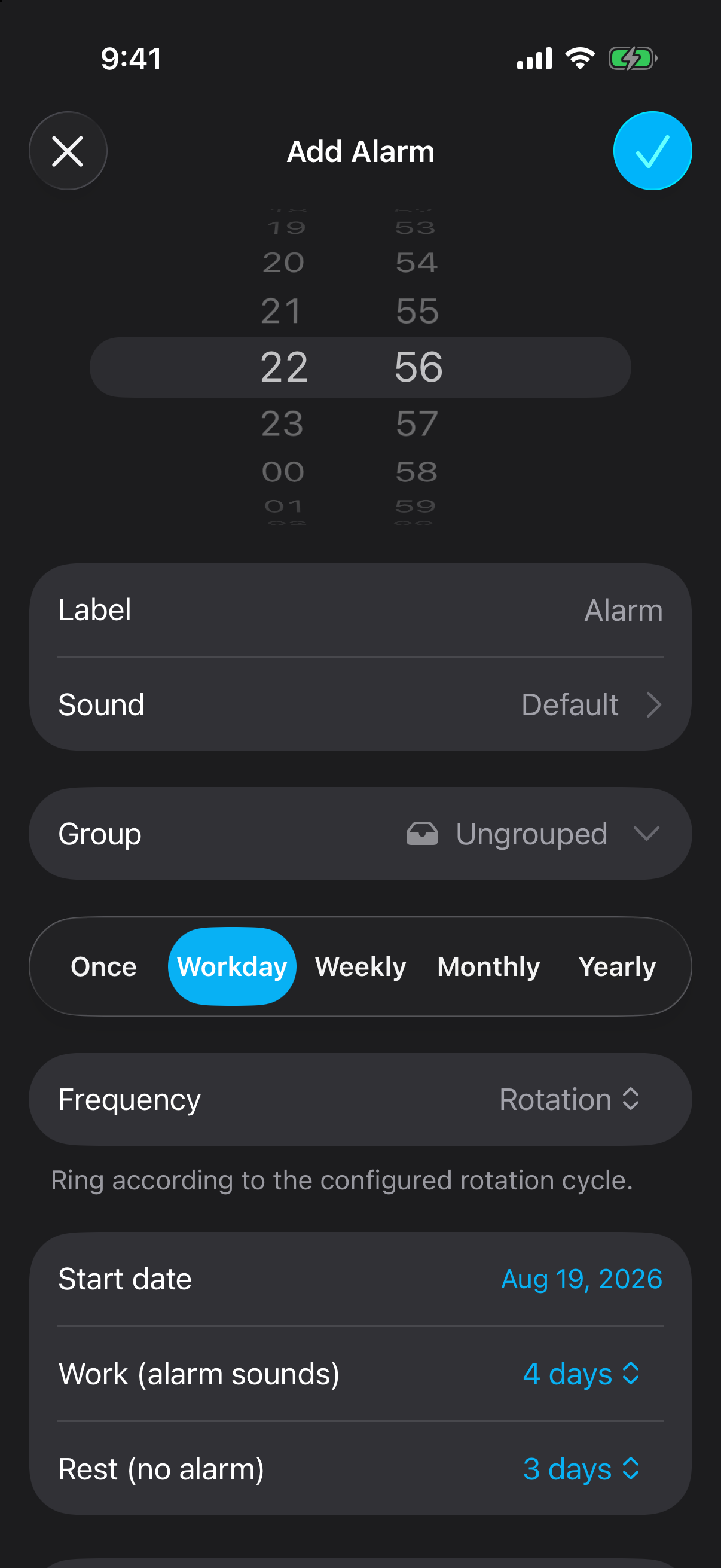
Choose Workday, then Rotation
Use the work/rest schedule controls. Select the first work day as the start date.
Enter the work and rest counts
For a two-on/two-off rota, choose 2 work days and 2 rest days. The four-day cycle repeats across weekdays.
Check the upcoming dates
Save the alarm, compare the next work block with your roster, and confirm that rest days stay clear.
How does a four-on/three-off alarm repeat?
Suppose your first work day is Monday, October 5, 2026, and your wake-up time is 5:30 AM. Set 4 work days and 3 rest days. The alarm covers October 5–8, stays silent October 9–11, and begins the next block on October 12.
For a day/evening/night/off pattern, start times differ within the cycle. A single work/rest alarm uses one wake-up time, so it cannot express that whole pattern by itself. Map the different starts to separate alarms or use specific-date alarms for irregular shifts.
What should you change when a shift is swapped?
Skip the next occurrence for a single rest day or leave day, then create a dated alarm for the replacement shift. When the underlying rota changes, update its start date and day counts. Keep separate groups for work and personal alarms so turning off a shift routine is easy.
An overnight shift needs a wake-up on the day it starts, even if it ends the next morning. Write down the start date and wake-up date before scheduling. For alternating work days, see how to set an alarm every other day.
Source: Apple: Clock alarm settings.
What else should you know?
Can a nurse alarm clock app follow an irregular roster?
For a stable work/rest pattern, use a repeating rotation. For shifts with changing dates or start times, create specified-date alarms from the roster and review them when the roster changes.
Does Alarm One automatically import my shift roster?
The Rotation setup described here is manual: enter a start date and work/rest day counts. Check your exact roster format and any available integration separately.
Can I keep an alarm off on rest days?
Yes. In Alarm One Rotation, the work count defines days that ring and the rest count defines days that stay silent. Check the start date against your rota.