Quick answer
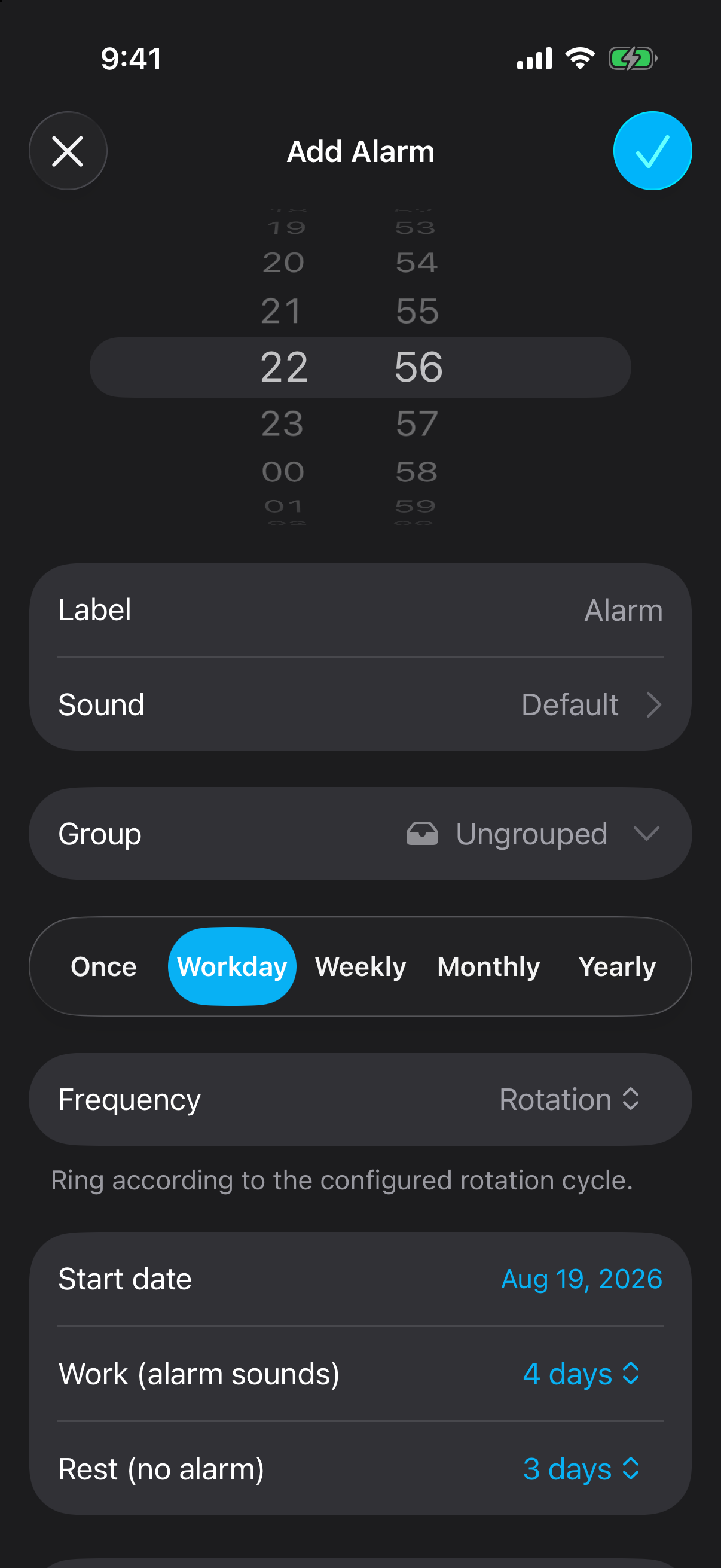
Choose Workday while creating an alarm, set the frequency to Rotation, then enter a start date, the number of work days when the alarm should sound, and the number of rest days when it should stay silent.
Choose a start date
Use the first work day of the rotation as the cycle anchor.
Set work days
Choose how many consecutive days the alarm should sound.
Set rest days
Choose how many consecutive days the alarm should stay silent.
Why shift alarms get messy
A fixed Monday-to-Friday alarm works when every workday starts at the same time. Rotating shift schedules do not. One week may begin before sunrise, the next may end after midnight, and an occasional cover shift can interrupt the pattern.
The usual workaround is manually switching alarms on and off or creating several copies for different weekdays. Both approaches become unreliable when the cycle moves across calendar weeks.
Set a work/rest rotation
Rotation treats the schedule as one repeating cycle. If you work four consecutive days and rest for three, the cycle length is seven days. The alarm sounds on the first four days, stays silent on the next three, and then starts again.
The start date matters because it tells Alarm One which day is day one of the work period. Pick the first work day in the current rota, then enter the work and rest counts shown on your schedule.
When your rota changes
When a new rota changes the pattern, edit the existing alarm rather than rebuilding it. Update the fields that define the cycle:
- Start date: move the anchor to the first work day of the new rota.
- Work days: change how many consecutive days should ring.
- Rest days: change how many consecutive days should stay silent.
For one-off changes
Keep the rotation intact when the underlying pattern has not changed. Use Alarm One's skip controls for a temporary exception, such as leave or a single swapped shift.
An example rotating shift alarm setup
- Alarm time: 5:30 AM.
- Start date: the first day of the next work block.
- Work: 4 days with the alarm sounding.
- Rest: 3 days with no alarm.
Alarm One repeats this seven-day cycle from the chosen start date. A two-on/two-off or seven-on/seven-off rota uses the same setup; only the two day counts change.
Frequently asked questions
Can the iPhone Clock app manage a rotating shift schedule?
It handles alarms on fixed weekdays, but it does not provide a repeating work-days/rest-days cycle. Alarm One Rotation repeats from a start date using the work and rest day counts you choose.
How does a rotating shift alarm work in Alarm One?
Choose the cycle start date, the number of consecutive work days when the alarm should sound, and the number of consecutive rest days when it should stay silent. The cycle then repeats.
What should I do when my rota changes?
Edit the start date or change the work and rest day counts so the next cycle matches the new rota.